How to Save Your Game in GTA 6
Updated November 21, 2026
On this page
More in GTA 6 Guides
To save in Grand Theft Auto VI, open the pause menu, select Game, then choose Save Game. You get 15 manual save slots plus an autosave, but you cannot save during an active mission.
How to save your game
- Press Options on PS5 or Menu on Xbox to open the pause menu.
- Select Game.
- Choose Save Game.
- Pick an empty slot, or overwrite an old save.
To load a save, go to Game, then Load Game, and pick the autosave or a manual save.
Manual saving is reportedly locked during the prologue. It opens once you reach Jason's house.
How autosave works
The game autosaves after missions and certain open world events. There is only one autosave, and each new one replaces the last. Loading an older manual save can also overwrite it, so do not treat autosave as your backup.
When you cannot save
- During a mission. The save option is usually grayed out until the mission ends.
- After using a cheat. Cheats disable saving until you quit and return. See our trophy guide for what else they block.
If a big heist is coming up, save before you start it.
How to use your 15 slots
GTA 6 has no mission replay, and chapter select and New Game Plus are reportedly missing at launch too, so plan on your saves being the only way back. This plan keeps you covered:
| Slots | Use them for |
|---|---|
| 1 to 5 | The start of each of the 5 chapters |
| 6 to 10 | The end of each chapter |
| 11 to 15 | Rotating saves as you play |
Each chapter centers on a different safehouse, and you cannot return to the old setup without a save. Our story missions guide shows how the chapters are laid out.
An early save worth making
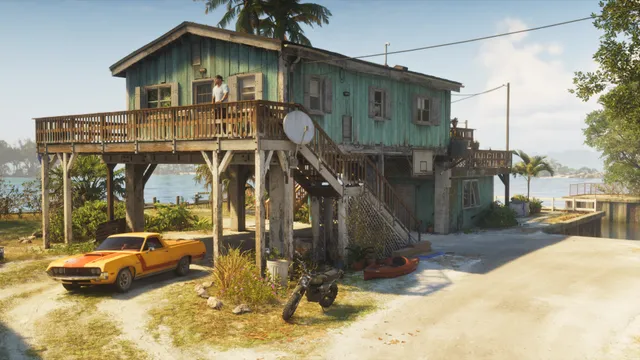
Save before you start fixing up Jason's house in Chapter 1. Any jobs you leave unfinished before picking up Lucia cannot be done later, and they affect the relationship between the two. Look for a paintbrush icon at each one:
- Steps: use the planks by the stairs near the driveway.
- Leaky roof: climb the yellow ladder by the front door.
- Railing: out back by the gym, between the squat rack and the ladder.
- Bedroom wall: put up the boards, then paint it in the color you pick.
If the game crashes
Some PS5 players report crashes with error code CE-108255-1, either in the middle of a session or when the game loads. A few say it happens every time they reach the same point in the story. The suggested fix is to update the game to the latest version, though players say that does not always help. A crash takes you back to your last save, so make a manual save before long stretches of play while the problem lasts.
What saving will not protect
A save will not bring back cash you lose in the moment. Dying costs you the money on hand and any stash bags you are carrying. Money in your BuckMe account stays safe, so bank it often. The GTA 6 money guide covers the best ways to earn it back.
FAQ
How do you save in GTA 6?
Open the pause menu, select Game, then choose Save Game and pick a slot. You can load a save from the same menu.
How many save slots does GTA 6 have?
GTA 6 has 15 manual save slots, plus an autosave.
Can you save during a mission in GTA 6?
No. Manual saving is unavailable during active missions, so save before you start a big job.
Can you replay missions in GTA 6?
There is no mission replay, and chapter select is reportedly missing at launch too. Keeping a manual save from each chapter is the way to go back.
Do cheats affect saving in GTA 6?
Yes. Using a cheat disables saving until you quit and return to the game, so never rely on cheats in your main save.
Sources
- How Do You Save Your Game In GTA 6?, GameSpot
- How to save game in GTA 6, PC Gamer
- GTA 6 How to Save, PowerPyx
- GTA 6: How To Save the Game, Game Rant
- GTA 6 (Grand Theft Auto VI) Trophy Guide & Roadmap, PowerPyx
- Can you replay missions in GTA 6?, GamesRadar+
- GTA 6 Trophy Guide & Achievements List (PS5 & Xbox Series X|S), GTABase
- How To Fix All Projects At Jason's House In GTA 6, GameSpot
- GTA 6: How to Repair Jason's House, Push Square
- GTA 6 Is Crashing On Some PS5s With CE-108255-1 Error Code, GameSpot
Checked against official sources on November 21, 2026. How we check facts
By the Respawndex editorial team.