GTA 6 Best Settings Guide
Updated November 20, 2026

On this page
More in GTA 6 Guides
The first settings to check in Grand Theft Auto VI are the control scheme and the HUD. If you are used to GTA 5, switch to Classic controls, and turn on the elements you want to see all the time. The game targets 30 frames per second on every console, and no performance mode has been announced.
To open the menu, press Options on PS5 or Menu on Xbox, then select Settings.
Our recommended settings
| Setting | Our pick | Why |
|---|---|---|
| Control Scheme | Classic if you played GTA 5 | Keeps your muscle memory |
| Control Scheme | Default if you are new | Sprint on the stick frees up your thumb |
| HUD | Leave Dynamic on | Keeps the screen clear, and one press brings it back |
| Accessible Combat | On if gunfights feel too hard | You take less damage |
| Reduced Vehicle Damage | On if crashes frustrate you | Your car survives longer |
Neither assist is reported to affect the story or trophies.
Default or Classic controls
GTA 6 changes the long-standing Rockstar layout. Sprint now sits on the left stick by default.
| Action | Default | Classic |
|---|---|---|
| Sprint | L3 / left stick | X on PS5, A on Xbox |
| Jump and climb | X on PS5, A on Xbox | Square on PS5, X on Xbox |
| Melee | Square on PS5, X on Xbox | Circle on PS5, B on Xbox |
| Crouch | Circle on PS5, B on Xbox | L3 / left stick |
To switch, go to Settings, then Control Scheme.
The Dynamic HUD
By default, the game hides the minimap, your money and your health, stamina and Focus bars to show off the world. Press down on the D-Pad to bring them up. You can toggle these elements on or off in Settings if you would rather see them all the time.
Combat and driving assists
Find these under Options, Settings, Gameplay:
- Accessible Combat: you take less damage in gunfights, and enemies take more.
- Reduced Vehicle Damage: your car takes less damage in crashes and combat.
Our combat tips can also help if fights feel tough.
Frame rate and graphics
GTA 6 targets 30 frames per second on PS5, PS5 Pro and Xbox Series X|S, and no graphics or performance modes have been announced. PS5 Pro adds sharper image quality through PlayStation Spectral Super Resolution, along with ray-traced shadows. Our GTA 6 platforms guide has the details.
DualSense and audio on PS5
The game supports the DualSense speaker, haptics and adaptive triggers. If you want to reduce them, you can adjust haptics and adaptive triggers in the accessibility settings. All in-game sound also uses Tempest 3D Audio, so headphones are a good choice.
First-person views
There is no full first-person mode, but you can use it in a few situations:
- Aiming: click R3 while aiming down a scope.
- Looking closely: press L2 or LT to focus on someone, then click L3 and R3.
- Using your phone and in certain vehicles.
Cinematic driving
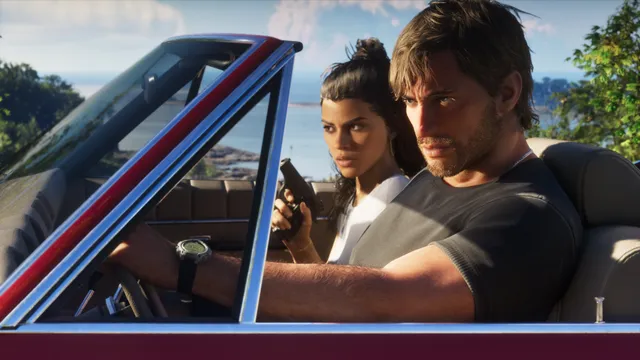
Hold down on the D-Pad in your car and press Options to turn on the cinematic view. Hold Circle in this mode to drive automatically to your waypoint.
Without a waypoint, your character just drives around. Auto drive reportedly works on boats too, which saves the trip out to a diving spot, and you can pick from three speeds. You can cancel it at any time, but you cannot use your phone while it is on.
New to the game? Start with our beginner tips.
FAQ
How do you get classic controls in GTA 6?
Press Options or Menu, go to Settings, and switch the control scheme to Classic. Sprint moves back to X on PS5 or A on Xbox.
Does GTA 6 have a performance mode?
No performance mode has been announced. GTA 6 targets 30 frames per second on PS5, PS5 Pro and Xbox Series X|S.
Does GTA 6 have a first-person mode?
There is no full first-person mode. You can only use first-person views in certain situations, such as aiming with a scope.
How do you show the minimap in GTA 6?
The default Dynamic HUD hides it. Press down on the D-Pad to bring it up, or change the HUD options in Settings.
Sources
- How to get classic GTA 5 controls in GTA 6, GamesRadar+
- GTA 6 first-person mode explained, GamesRadar+
- GTA 6 Finally Changed The Default Rockstar-Game Controls, GameSpot
- GTA 6: Tips & Tricks You Need to Know, Push Square
- GTA 6: How to Go First-Person, Push Square
- Pre-load Grand Theft Auto VI on PS5 starting today, PlayStation Blog
- Xbox Vs. PS5: GTA 6 Specs Revealed, And These Are The Biggest Differences, Pure Xbox
- GTA 6’s Auto-Drive Feature Is Easy To Miss But Extremely Handy, GameSpot
Checked against official sources on November 20, 2026. How we check facts
By the Respawndex editorial team.